reabse介绍
我们在使用git提交远程仓库,或者同步远程仓库代码到本地仓库,查看提交记录的时候,提交历史往往是一条分叉的树,这在多人协作开发的过程中是十分常见的。有没有办法使我们的提交干净整洁?提交记录更加简洁一点?这时候rebase派上用场。git rebase 有三个作用:1,合并多个commmit为一个完整的commit;2,将提交记录整洁干净;3,将某一段commit合并到另一个分支。接下来将详细介绍这三个作用的使用场景和用法。
rebase作用
合并多个commit为一个完整的commit
1.首先查看工作区状态,确保工作区、暂存区、版本库已经远程仓库一致。然后我们做一些普通的add 和commit 操作。
1 | D:\rushgit (master -> origin) |
2 | λ git status ##查看当前状态 |
3 | On branch master |
4 | nothing to commit, working directory clean |
5 | D:\rushgit (master -> origin) |
6 | λ touch a.go ##创建一个新文件a.go,添加到暂存区并提交到本地版本库 |
7 | D:\rushgit (master -> origin) |
8 | λ git status |
9 | On branch master |
10 | Untracked files: |
11 | (use "git add <file>..." to include in what will be committed) |
12 | a.go |
13 | nothing added to commit but untracked files present (use "git add" to track) |
14 | D:\rushgit (master -> origin) |
15 | λ git add a.go |
16 | D:\rushgit (master -> origin) |
17 | λ git commit -m 'add-a.go' |
18 | [master ed0e588] 'add-a.go' |
19 | 1 file changed, 0 insertions(+), 0 deletions(-) |
20 | create mode 100644 a.go |
21 | D:\rushgit (master -> origin) |
22 | λ touch b.go ##创建一个新文件b.go,添加到暂存区并提交到本地版本库 |
23 | D:\rushgit (master -> origin) |
24 | λ git add b.go |
25 | D:\rushgit (master -> origin) |
26 | λ git commit -m 'add-b.go' |
27 | [master 2c0c671] 'add-b.go' |
28 | 1 file changed, 0 insertions(+), 0 deletions(-) |
29 | create mode 100644 b.go |
30 | D:\rushgit (master -> origin) |
31 | λ vim a.go ##修改a.go文件的内容,添加到暂存区并提交到本地版本库 |
32 | D:\rushgit (master -> origin) |
33 | λ git status |
34 | On branch master |
35 | Changes not staged for commit: |
36 | (use "git add <file>..." to update what will be committed) |
37 | (use "git checkout -- <file>..." to discard changes in working directory) |
38 | modified: a.go |
39 | no changes added to commit (use "git add" and/or "git commit -a") |
40 | D:\rushgit (master -> origin) |
41 | λ git add a.go |
42 | D:\rushgit (master -> origin) |
43 | λ git commit -m 'modify-a.go' |
这时候图形化方式查看一下git的提交历史记录:
1 | λ git log --graph --pretty=oneline |
2 | *409c288f44bcbcbcb3f2a9a91ac00b7967a2ec91 'modify-a.go' |
3 | *2c0c671f35f238a1367eea8681bcdcad82b4ba1d 'add-b.go' |
4 | *ed0e58875017a20e4c165f5e6746fe939a6f7ac7 'add-a.go' |
可以看到本地版本库有三条提交记录,分别对应我们的三次提交。这三次的更改就是添加了a.go,b.go,并修改了a.go。当我们向远程关联分支提交的时候,可不可以合并成一个commit呢?就是通过rebase功能。
2.使用git rebase 合并多个commit为一个commit,使本地版本仓库的提交记录简洁,提交到远程也更清晰。
命令为git rebase -i [start commit-id] [end commit-id]。start commit-id和end commit-id按照字面意思就是开始id和结束id,也就是你想合并哪一段区间的提交。这个区间是前开后闭的,也就是如果你想合并3个commit的提交,那么start commit-id需要设置为倒数第四个commit-id。此处我们应该设置为bdc2c7a88 。
1 | λ git rebase -i bdc2c7a88 |
2 | pick ed0e588 'add-a.go' |
3 | pick 2c0c671 'add-b.go' |
4 | pick 409c288 'modify-a.go' |
5 | # Rebase bdc2c7a..409c288 onto bdc2c7a (3 command(s)) |
6 | # |
7 | # Commands: |
8 | # p, pick = use commit |
9 | # r, reword = use commit, but edit the commit message |
10 | # e, edit = use commit, but stop for amending |
11 | # s, squash = use commit, but meld into previous commit |
12 | # f, fixup = like "squash", but discard this commits log message |
13 | # x, exec = run command (the rest of the line) using shell |
14 | # d, drop = remove commit |
15 | # |
16 | # These lines can be re-ordered; they are executed from top to bottom. |
17 | # |
18 | # If you remove a line here THAT COMMIT WILL BE LOST. |
19 | # |
20 | # However, if you remove everything, the rebase will be aborted. |
21 | # |
22 | # Note that empty commits are commented out |
此时可以看到git给出了此次rebase的操作提示,在此给一下相关命令的解释:
1 | 1,p(pick)保留此commit |
2 | 2,r(reword)保留此commit但是需要修改commit的注释 |
3 | 3,e(edit)保留该commit, 但要停下来修改该提交(不仅仅修改注释) |
4 | 4,s(squash)将该commit和前一个commit合并 |
5 | 5,f(fixup):将该commit和前一个commit合并,但不要保留该提交的注释信息 |
6 | 6,e(exec):执行shell命令 |
7 | 7,d(drop):要丢弃该commit(缩写:d) |
此时如果我们只保留最后一个commit(409c28),其他两个commit直接和前一个commit合并,但是同时保留注释信息。这时候就修改命令行如下:
1 | p ed0e588 'add-a.go' |
2 | s 2c0c671 'add-b.go' |
3 | s 409c288 'modify-a.go' ##此时出现如下界面,提示我们即将完成的操作,可以继续修改commit相关信息。 |
4 | ################################################### |
5 | # This is a combination of 3 commits. |
6 | # The first commits message is: |
7 | 'add-a.go' |
8 | # This is the 2nd commit message: |
9 | 'add-b.go' |
10 | # This is the 3rd commit message: |
11 | 'modify-a.go' |
12 | # Please enter the commit message for your changes. Lines starting |
13 | # with '#' will be ignored, and an empty message aborts the commit. |
14 | # |
15 | # Date: Sat May 11 22:58:50 2019 +0800 |
16 | # |
17 | # interactive rebase in progress; onto bdc2c7a |
18 | # Last commands done (3 commands done): |
19 | # s 2c0c671 'add-b.go' |
20 | # s 409c288 'modify-a.go' |
21 | # No commands remaining. |
22 | # You are currently editing a commit while rebasing branch 'master' on 'bdc2c7a'. |
23 | # |
24 | # Changes to be committed: |
25 | # new file: a.go |
26 | # new file: b.go |
27 | # |
28 | ``` |
29 | 3.此时可以看到rebase的效果如下: |
30 | /git-result.PNG) |
31 | 使用git log查看结果如下(reabase操作会生成一个新的commit-id来完成合并): |
32 | ```java |
33 | λ git log |
34 | commit cf0a58d24cbf09973645baaab039177bd857328d |
35 | Author: VfEver <13146770925@126.com> |
36 | Date: Sat May 11 22:58:50 2019 +0800 |
37 | 'add-a.go' |
38 | 'add-b.go' |
39 | 'modify-a.go' |
简洁的提交记录,去除分叉
1.从当前分支新拉出来一个分支,取名为develop,然后从此分支做一个commit,然后在master分支做一个commit并提交。此时develop分支和远程master分支就有了分叉。
1 | D:\rushgit (master -> origin) |
2 | λ git status |
3 | On branch master |
4 | nothing to commit, working directory clean |
5 | D:\rushgit (master -> origin) |
6 | λ git checkout -b develop |
7 | Switched to a new branch 'develop' |
8 | D:\rushgit (develop -> origin) |
9 | λ touch c.go |
10 | D:\rushgit (develop -> origin) |
11 | λ git add c.go |
12 | D:\rushgit (develop -> origin) |
13 | λ git commit -m 'add-g.go' |
14 | [develop 861b393] 'add-g.go' |
15 | 1 file changed, 0 insertions(+), 0 deletions(-) |
16 | create mode 100644 c.go |
17 | D:\rushgit (master -> origin) |
18 | λ git checkout master ##在此做一个add、commit、push(add commit省略) |
19 | Switched to branch 'master' |
20 | λ git push |
21 | Counting objects: 6, done. |
22 | Delta compression using up to 4 threads. |
23 | Compressing objects: 100% (4/4), done. |
24 | Writing objects: 100% (6/6), 599 bytes | 0 bytes/s, done. |
25 | Total 6 (delta 1), reused 0 (delta 0) |
26 | remote: Resolving deltas: 100% (1/1), done. |
27 | To git.com:VfEver/rushgit.git |
28 | bdc2c7a..fc6eb4b master -> master |
29 | ``` |
30 | /git_rebase_1.PNG) |
31 | 2.此时如果我们在develop分支pull一下,将远程分支的提交同步到本地develop分支: |
32 | ```java |
33 | D:\rushgit (develop -> origin) |
34 | λ git pull origin master |
35 | From github.com:VfEver/rushgit |
36 | * branch master -> FETCH_HEAD |
37 | Merge made by the 'recursive' strategy. |
38 | e.go | 0 |
39 | 1 file changed, 0 insertions(+), 0 deletions(-) |
40 | create mode 100644 e.go |
此时的pull操作还会产生一个commit-id,现在的分支树用图形表示如下: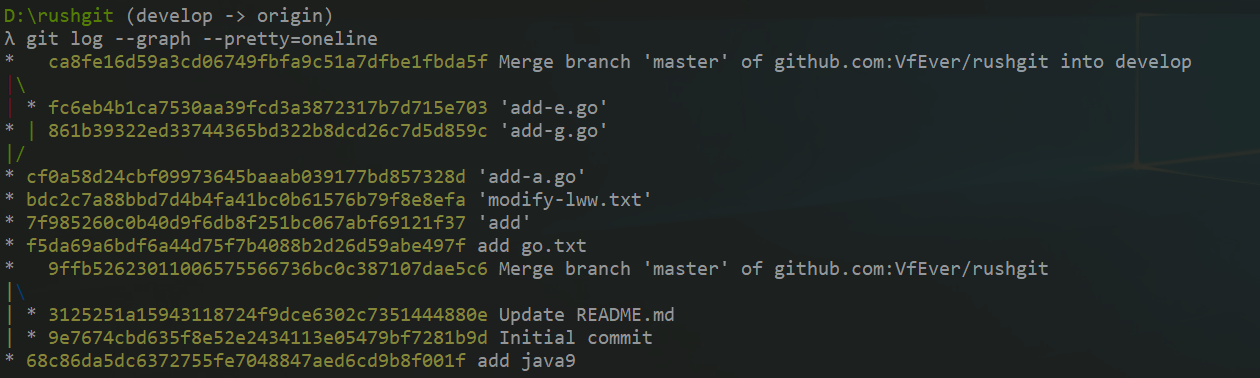
可以看到develop和远程master合并之后,产生了一个新的commit-id(ca8fe16),同时合并了远程的仓库提交历史,并产生了分叉。此时本地develop分支结果如下: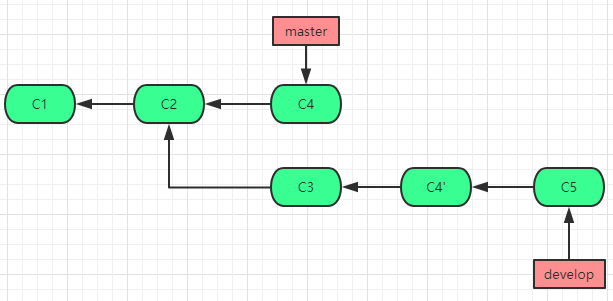
3.如何解决这个分叉?就是接下来rebase的操作,我们先将本地develop分支回滚到上一个版本。
1 | D:\rushgit (develop -> origin) |
2 | λ git reset --hard 861b3 |
3 | HEAD is now at 861b393 'add-g.go' |
4 | D:\rushgit (develop -> origin) |
5 | λ git log |
6 | commit 861b39322ed33744365bd322b8dcd26c7d5d859c |
7 | Author: VfEver <13146770925@126.com> |
8 | Date: Sun May 12 09:25:23 2019 +0800 |
9 | 'add-g.go' |
10 | commit cf0a58d24cbf09973645baaab039177bd857328d |
此时我们进行rebase操作,将master分支合并到本地develop分支:
1 | λ git rebase fc6eb4b1 |
2 | First, rewinding head to replay your work on top of it... |
3 | Applying: 'add-g.go' |
4 | λ git log --pretty=oneline |
5 | f5c7f65eacd5f7f93747698d436f8c764ec4e916 'add-g.go' |
6 | fc6eb4b1ca7530aa39fcd3a3872317b7d715e703 'add-e.go' |
7 | cf0a58d24cbf09973645baaab039177bd857328d 'add-a.go' |
8 | bdc2c7a88bbd7d4b4fa41bc0b61576b79f8e8efa 'modify-lww.txt' |
9 | 7f985260c0b40d9f6db8f251bc067abf69121f37 'add' |
10 | f5da69a6bdf6a44d75f7b4088b2d26d59abe497f add go.txt |
11 | 9ffb52623011006575566736bc0c387107dae5c6 Merge branch 'master' of github.com:VfEver/rushgit |
12 | 3125251a15943118724f9dce6302c7351444880e Update README.md |
13 | 9e7674cbd635f8e52e2434113e05479bf7281b9d Initial commit |
14 | 68c86da5dc6372755fe7048847aed6cd9b8f001f add java9 |
此时的develop分支提交树则变成了如下(一条干净整洁的直线):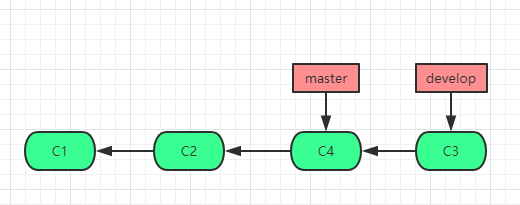
将某一段commit合并到另一个分支
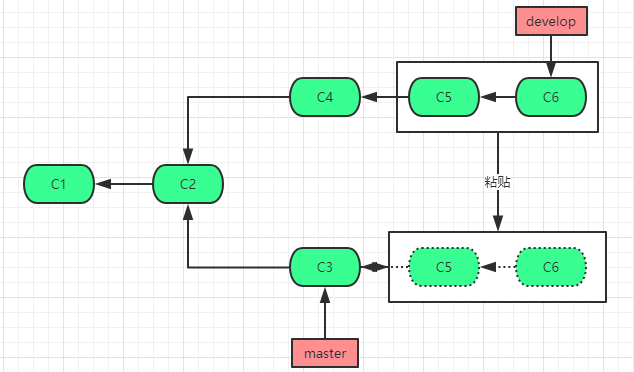
如图我想将处于develop分支的C5到C6的提交粘贴至master分支,这个时候通过rebase功能也可以达到这个效果。
1.checkout develop分支,在develop分支做三次commit(C4、C5、C6)。之后在master分支做一个C3的commit。
1 | D:\rushgit (develop -> origin) |
2 | λ touch z.sh |
3 | D:\rushgit (develop -> origin) |
4 | λ git add z.sh |
5 | D:\rushgit (develop -> origin) |
6 | λ git commit -m 'add-z.sh' |
7 | [develop 16c1602] 'add-z.sh' |
8 | 1 file changed, 0 insertions(+), 0 deletions(-) |
9 | create mode 100644 z.sh |
10 | D:\rushgit (develop -> origin) |
11 | λ touch x.sh |
12 | D:\rushgit (develop -> origin) |
13 | λ git add x.sh |
14 | D:\rushgit (develop -> origin) |
15 | λ git commit -m 'add-x.sh' |
16 | [develop 298bf3a] 'add-x.sh' |
17 | 1 file changed, 0 insertions(+), 0 deletions(-) |
18 | create mode 100644 x.sh |
19 | D:\rushgit (develop -> origin) |
20 | λ touch c.sh |
21 | D:\rushgit (develop -> origin) |
22 | λ git add c.sh |
23 | D:\rushgit (develop -> origin) |
24 | λ git commit -m 'add-c.sh' |
25 | [develop 5d2f6c0] 'add-c.sh' |
26 | 1 file changed, 0 insertions(+), 0 deletions(-) |
27 | create mode 100644 c.sh |
28 | D:\rushgit (develop -> origin) |
29 | λ git checkout master |
30 | Switched to branch 'master' |
31 | Your branch is up-to-date with 'origin/master'. |
32 | D:\rushgit (master -> origin) |
33 | λ touch v.sh |
34 | D:\rushgit (master -> origin) |
35 | λ git add v.sh |
36 | D:\rushgit (master -> origin) |
37 | λ git commit -m 'add-v.sh' |
38 | [master 7978153] 'add-v.sh' |
39 | 1 file changed, 0 insertions(+), 0 deletions(-) |
40 | create mode 100644 v.sh |
2.此时在master分支,将develop分支的C5-C6的提交粘贴至当前分支,就是使用git rebase [start commit-id] [end commit-id] –onto [branchName] 。同上,这个起止点也是一个左开右闭区间,所以起点要前进一个,也就是git rebase C4 C6 –onto master。
1 | D:\rushgit (develop -> origin) |
2 | λ git rebase 16c1602 5d2f6c --onto master |
3 | First, rewinding head to replay your work on top of it... |
4 | Applying: 'add-x.sh' |
5 | Applying: 'add-c.sh' |
6 | D:\rushgit (HEAD detached at 4ebf303 -> origin) |
此时HEAD指向了4ebf303(当前的HEAD可以认为是一个游离的HEAD),一个新的commit-id。此时master分支HEAD其实并没有指向当前粘贴过来的现在的commit-id。当我们试图切回master分支的时候,会给我们一个提示:
1 | λ git checkout master |
2 | Warning: you are leaving 2 commits behind, not connected to |
3 | any of your branches: |
4 | |
5 | 4ebf303 'add-c.sh' |
6 | 57f109c 'add-x.sh' |
7 | If you want to keep them by creating a new branch, this may be a good time |
8 | to do so with: |
9 | git branch <new-branch-name> 4ebf303 |
10 | Switched to branch 'master' |
11 | Your branch is ahead of 'origin/master' by 1 commit. |
12 | (use "git push" to publish your local commits) |
提示显示,此时正在丢弃两个提交,而且这两个提交并没有关联到任何分支。我们也可以通过命令git branch
1 | D:\rushgit (master -> origin) |
2 | λ git reset --hard 797815 |
3 | HEAD is now at 7978153 'add-v.sh' |
4 | λ git log --pretty=oneline |
5 | 4ebf303885c1c4e3a034b4b3fd2ad8ff0debff74 'add-c.sh' |
6 | 57f109c8ea5805bfdaee7631eb2575ff71317a49 'add-x.sh' |
7 | 79781531517c9f834564f9a43ef213e90cc74156 'add-v.sh' |
8 | 584b02b6bc55a76b50f83a466f505ee08ad6d189 'add-w.go' |
9 | fc6eb4b1ca7530aa39fcd3a3872317b7d715e703 'add-e.go' |
10 | cf0a58d24cbf09973645baaab039177bd857328d 'add-a.go' |
11 | bdc2c7a88bbd7d4b4fa41bc0b61576b79f8e8efa 'modify-lww.txt' |
12 | 7f985260c0b40d9f6db8f251bc067abf69121f37 'add' |
13 | f5da69a6bdf6a44d75f7b4088b2d26d59abe497f add go.txt |
14 | 9ffb52623011006575566736bc0c387107dae5c6 Merge branch 'master' of github.com:VfEver/rushgit |
15 | 3125251a15943118724f9dce6302c7351444880e Update README.md |
16 | 9e7674cbd635f8e52e2434113e05479bf7281b9d Initial commit |
17 | 68c86da5dc6372755fe7048847aed6cd9b8f001f add java9 |
这就完成了C5、C6到master分支C3后的粘贴。如果使用简单的git rebase [branch-name],就是单纯将branch-name的分支上提交的代码复制到当前分支,当前的分支提交在后(也就是作为最新的commit添加在从其他分支粘贴过来的提交之后)。